
Select the model you want to generate your video with.
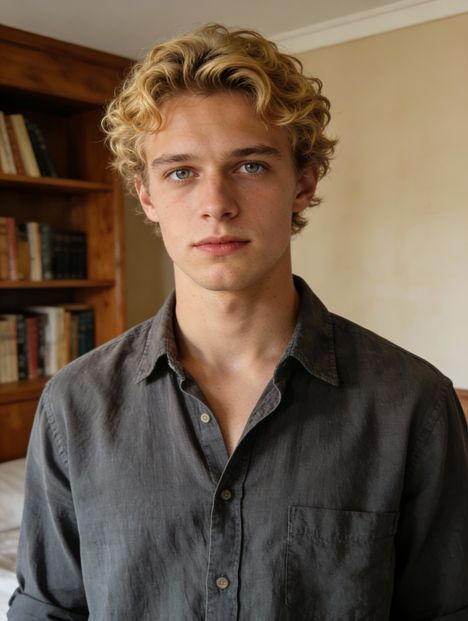
Same orientation as the reference video. Supports up to 30s video generation.
No Watermark
Private
在线免费使用 Kling 2.6 Motion Control(无需下载,即点即用)
从参考视频中复制动作并应用于任何角色,借助 Kling AI 创作出富有感染力的视频。
为什么大家都在关注 Kling 2.6 Motion Control
Kling 2.6 Motion Control 是由快手开发的 AI 视频生成工具 Kling AI 的热门功能,它允许您从真实视频中复制动作与表情,并将其应用到任意角色图像上。相比传统提示词驱动方式,Kling 更忠实地还原原始表演,使角色动作自然、回应自然、整体连贯。创作者利用 Kling AI 2.6 Motion Control 来为 AI 头像添加动画、构建短片场景、重新演绎热门动作,或为 TikTok、X 等平台制作引人关注的内容。
Kling 2.6 Motion Control 主要特性
通过 Kling 2.6 Motion Control 实现高度同步的动作
借助 Kling 2.6 Motion Control,角色动作、面部表情和整体表演在视频中始终保持同步。避免了动作漂移或一致性缺失的问题,使画面更具连贯性和表现力,适用于叙事性强的创意内容与故事讲述。
Kling AI 2.6 Motion Control 实现复杂动作再现
借助 Kling AI 2.6 Motion Control,快速处理舞蹈编排、戏剧性手势、体育动作等复杂动作。即使在复杂序列中,动作依然结构清晰、流畅自然,因此许多创作者将其用于舞蹈视频、电影级表演和角色动画。
Kling AI Motion Control 精准控制手部与手势
通过 Kling AI Motion Control 更真实地还原指向、挥手、细微手臂动作和自然手部行为等细节。这对说话角色、讲解者、教学视频以及依赖精细动作表现力的场景尤为重要。
Kling AI 视频生成器 30 秒单帧动态序列
Kling AI 视频生成器支持最长30秒的连续动作片段,使角色能够在完整场景中自然表演,无需频繁重置或中断连贯性。这一30秒的能力特别适合短片、叙事剪辑、表演视频及对时间节奏要求严格的创意序列。
通过 Kling 2.6 Motion Control 实现场景与风格的灵活控制
除了动作控制之外,Kling 2.6 Motion Control 还支持通过指令引导场景氛围、视觉风格与环境设定,同时保持原始表演的完整性。您可以将同一段动作应用于不同背景、情绪或美学风格中,从而从单一表演中探索多种创意方向。
Kling 2.6 Motion Control 与同类模型的性能表现对比
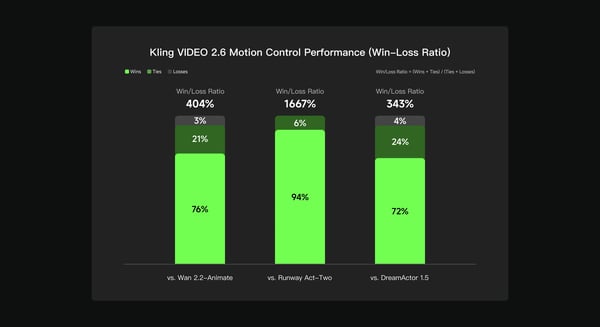
根据 Kling AI 团队内部评测,Kling VIDEO 2.6 Motion Control 在多维度人类偏好测试中与 Wan 2.2-Animate、Runway Act-Two 和 DreamActor 1.5 进行了对比,测试维度包括动作质量、视觉一致性和整体输出性能。结果显示,Kling 2.6 Motion Control 表现优于 Wan 2.2-Animate,胜出率更高;相较于 Runway Act-Two 提升 1667%,相较于 DreamActor 1.5 提升 343%,表现出更强的一致性与更可靠的运动控制视频生成能力,适用于多种创意场景。
如何在 Bylo.ai 免费制作视频
按照以下简单步骤,即可轻松上手我们的平台。
选择视频作为动作参考
首先上传一段包含你想要复制的动作、手势或表演的短视频。Kling AI Motion Control 会将这段视频作为你最终视频的动作参考。
上传角色图片
上传你希望动画化的角色图像——可以是人物、头像、插画或风格化形象。Kling AI 2.6 Motion Control 将参考视频中的动作直接套用到该角色上。
生成并下载你的视频
点击生成按钮,预览结果并下载你的动作控制视频。Kling AI 视频生成器会自动帮你完成动画制作,让你专注于创意构思,无需手动剪辑。
用户使用 Kling AI 2.6 Motion Control 创作的内容展示
借助 Kling AI Motion Control 制作 AI 角色与说话头像
Creators use Kling AI Motion Control to animate AI characters that speak, react, and express emotion naturally. By transferring motion and facial performance from a reference video, avatars feel more alive and believable, making this use case popular for storytelling, VTuber-style content, and virtual presenters.
借助 Kling 2.6 Motion Control 制作舞蹈、表演与爆款短视频
With Kling 2.6 Motion Control, creators can remix dance videos, acting performances, and expressive motion into new characters. This workflow is widely used for short-form content on TikTok, Reels, and X, where motion accuracy and expressive timing make videos stand out.
用 Kling AI 视频生成器制作短片与故事
The Kling AI video generator enables filmmakers and storytellers to prototype scenes quickly by applying performance from one video onto different characters and visual styles. This allows creators to explore ideas, test concepts, and build narrative clips without complex animation tools.
利用 Kling AI 制作教育类视频
Many users rely on Kling AI to create engaging explainer videos, tutorials, and presentation-style content. By animating characters with clear gestures and natural delivery, educational videos become easier to follow and more visually engaging.
提升 Kling AI Motion Control 效果的小技巧
遵循以下建议,让你更好地使用平台功能。
为 Kling 2.6 Motion Control 选择清晰的运动参考视频
请选择主体清晰可见、动作连贯的参考视频。画面稳定、构图清晰的素材有助于 Kling 2.6 Motion Control 更精准地捕捉动作,生成更流畅的动画效果。
确保身体与四肢在 Kling AI Motion Control 中清晰可见
为获得最佳效果,请确保参考视频中全身、手臂和手部清晰可见,没有被遮挡或裁剪。Kling AI Motion Control 在能够清晰追踪整个场景中姿态与肢体动作时表现更佳。
使用 Kling AI Motion Control 匹配角色的构图
请尽量让角色图像与参考图像的构图保持一致(例如,全身图像搭配全身动作,半身图像搭配半身动作)。这有助于 Kling AI Motion Control 维持更自然的比例和一致的运动效果。
使用 Kling AI 视频生成器调整风格与场景
当动作效果满意后,可以尝试不同的提示词来探索不同的背景、氛围和视觉风格。Kling AI 视频生成器支持复用同一动作,同时测试多种创意方向。
寻找一种全新的AI视频创作方式
Kling Motion Control 专为精确镜头运动和以动作为主的场景设计。如果你的目标超越了动作控制,希望进行完整的叙事视频创作,可尝试 Kling 3.0。作为一款独立的 AI 视频模型,Kling 3.0 专注于电影级多镜头生成、原生音频、角色一致性以及更长的视频时长,适用于故事叙述、对白场景及完整 AI 生成视频。