
Select the model you want to generate your image with.
Cut Out Images Instantly with Free AI Background Remover
Cut out images in seconds with free AI background remover – No Editing Skills Needed!

Your Generated Images
Key Features of Bylo.ai's AI Cut Out Image Tool
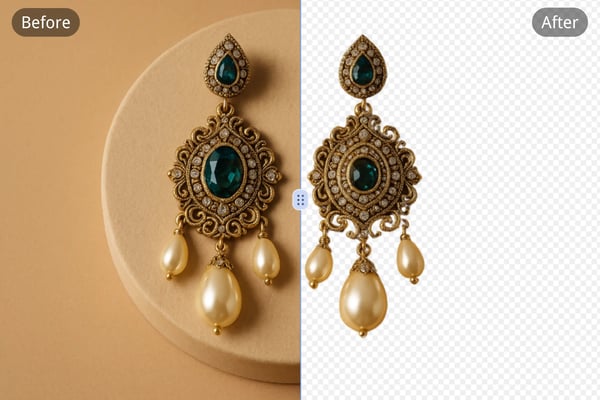
AI-Powered Precision
Bylo.ai uses advanced AI to cut out image backgrounds automatically with exceptional accuracy. Easily remove complex edges like hair, fur, and fine details without manual effort.

Free Online Cut Out Image Tool
Enjoy full access to Bylo.ai’s cut out image free online tool with no downloads required. Simply upload your image and get a high-quality transparent PNG in seconds.

High-Quality Output in PNG Format
All background remover results are delivered in crisp, high-resolution PNG format with transparent backgrounds—perfect for product photos, design assets, and social media visuals.

Versatile for Multiple Applications
The cut out image tool is ideal for various applications, including e-commerce product photos, social media content, and personal design projects. It delivers clean, transparent cutouts ready for any creative or professional use.
How to Use Bylo.ai to Cut Out Image Backgrounds
Step 1: Upload Your Image
Drag and drop your photo or select a file from your device. Bylo.ai supports common formats like PNG, JPG, and WEBP.
Step 2: Let AI Work Its Magic
Our AI background remover will automatically cut out the image background in seconds. No manual editing is needed.
Step 3: Download and Reuse
Download your image in high-resolution PNG with a transparent background. Use it for design, e-commerce, or social media instantly.
What Users Say About Our Cut Out Image Tool
Bylo.ai's AI cut out image tool helped me create perfect product shots in seconds. It’s a game-changer for my store!
Emily Carter
eCommerce Seller
I’ve tried multiple tools, but Bylo.ai delivers the best background remover results, especially with hair and intricate edges.
Alex Moreno
Graphic Designer
Cutting out image backgrounds for posts has never been easier. This tool saves me so much time and keeps my visuals sharp.
Rachel Li
Social Media Strategist
Great free online cut out image tool! The quality of the PNG exports is excellent, and I love that it's so fast.
Tom Harris
Freelance Blogger
I use it to cut out image backgrounds before applying filters and collages. Works great even with complex details.
Sophie Nguyen
Photography Enthusiast
Bylo.ai is now my go-to tool for quick image background removal. It's accurate, fast, and doesn’t require Photoshop skills.
Daniel Kim
Marketing Consultant
Frequently Asked Questions
Is Bylo.ai's cut out image tool free?
Yes, you can use the cut out image feature for free online without binding a credit card.
What image formats does Bylo.ai support?
You can upload PNG, JPG, WEBP, and other common image formats to use the background remover.
How fast does the cut out image tool work?
Most images are processed in just a few minutes, thanks to Bylo.ai’s advanced AI engine.
Can I use the tool on mobile devices?
Yes, the cut out image feature works seamlessly across phones, tablets, and desktops.
Does Bylo.ai handle complex backgrounds like hair?
Absolutely! Our AI is trained to handle fine details such as hair, fur, and soft edges with precision.
Do I need photo editing skills to use this tool?
Not at all. Bylo.ai’s interface is intuitive—no design experience needed to remove image backgrounds.
Can I edit the cutout image further?
Yes, after removing the background, you can use other AI tools to add effects, new backgrounds, or text.