
Select the model you want to generate your image with.
Free Online Christmas Photo Editor - Add Christmas Background to Photo on Bylo.ai
Use Bylo.ai’s Christmas photo editor to add a holiday scene to your photo online. Try it free today for the perfect Christmas images.

Your Generated Images
Key Features of Bylo.ai's Christmas Photo Editor
Free Online Christmas Photo Editor – Effortless Editing Anytime
Bylo.ai offers an intuitive Christmas photo editor that lets you easily add a festive Christmas background to any photo. With just a few clicks, transform your ordinary images into festive masterpieces, ready for sharing or printing. Whether you’re looking to add a Christmas scene to a photo for a holiday card or social media post, this tool makes it easy and completely free to use.

Natural Background Replacement – Perfect Fusion and Adjustment
Once your photo is ready, you can adjust the background to perfectly match the lighting and color tones of the subject. Christmas Photo Editor provides precise edge blending, shadow matching, and color corrections, ensuring that your Christmas scene integrates naturally with the main subject. This makes your photo appear as if it was taken in the exact Christmas setting, giving it a professional and polished look.
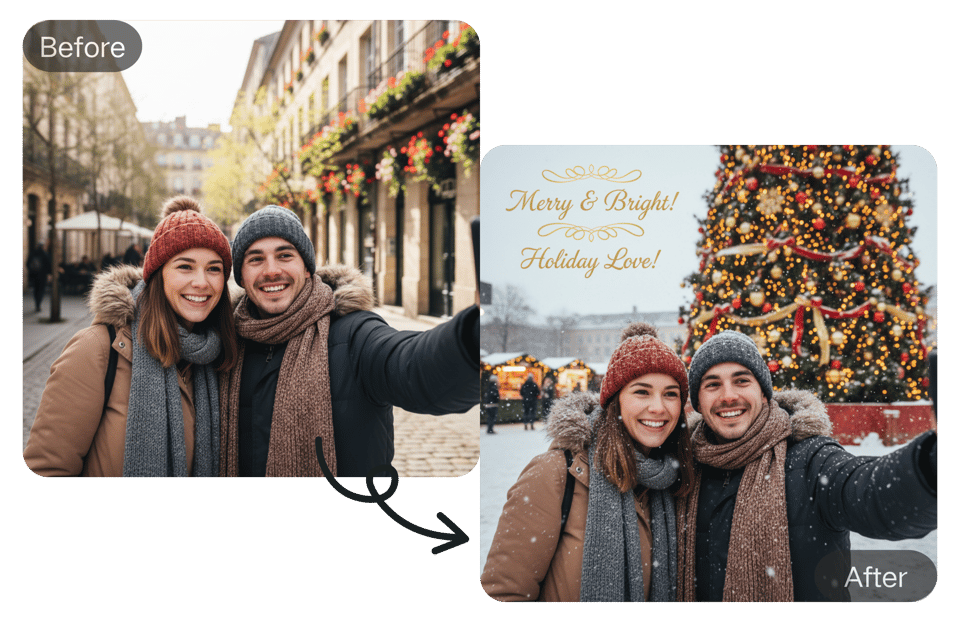
Enhance Your Images with Filters, Stickers, and Holiday Decorations
You can simply upload reference images to add a touch of magic to your photo with your desired Christmas-themed filters, stickers, and festive decorations. Whether it’s a snow effect, Santa’s sleigh, or twinkling lights, these elements help create the perfect Christmas atmosphere. The easy-to-use editor makes it fun and simple to enhance your photo, ensuring that every detail radiates the holiday spirit. Perfect for making your photos stand out on social media or as part of your holiday greetings.
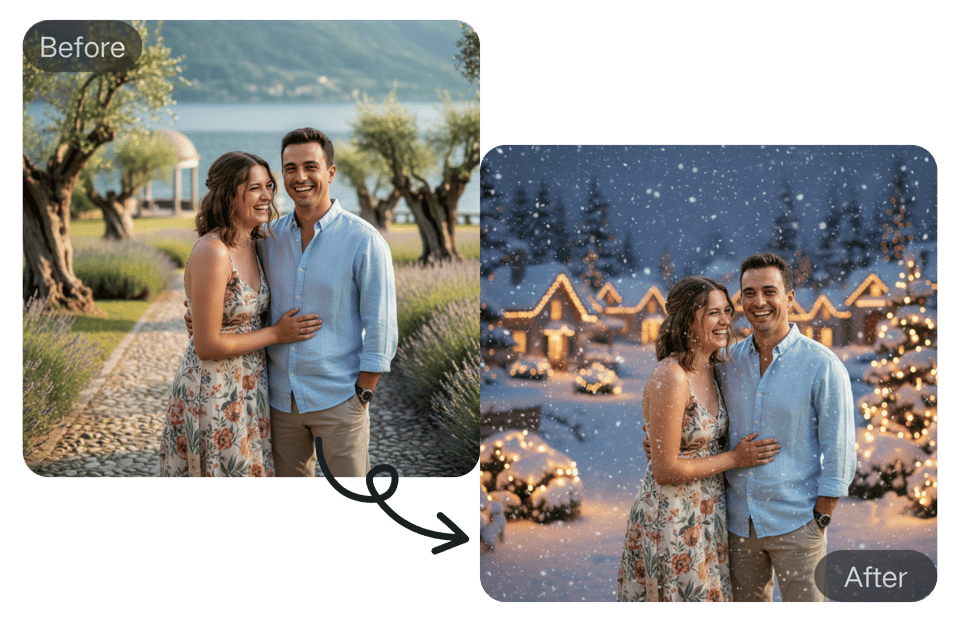
Simple, Fast, and Fun– No Installation Needed
With Bylo.ai, there’s no need for complex software installation. Simply upload your photo, enter a prompt, and enjoy the magic – all directly from your browser. Free online Christmas photo editor works seamlessly on both desktop and mobile devices, allowing you to create and download your holiday images anywhere, anytime. With one-click export, you can quickly share or save your festive creations with minimal effort.

How to Add Christmas Background To Photo Online Free?
Step 1: Upload Your Image and Enter a Prompt
Upload your photo to the Christmas photo editor and enter a prompt to specify your desired Christmas background or scene.
Step 2: Hit Button to Let AI Generate Christmas Photo
Once your photo and prompt are uploaded, hit the generate button to let the AI generate your Christmas image in seconds.
Step 3: Check and Download Your Photo
Review the generated photo to ensure it fits your idea, then one-click download to save your new Christmas image for sharing.
Top Use Cases for Christmas Photo Editor Online
Edit Family Photos for a Perfect Holiday Keepsake
It allows you to add Christmas background to photo for free, transforming your photos into festive masterpieces. Whether it's a selfie or a candid moment, you can instantly add a Christmas scene to a photo, making it perfect for sharing on platforms like Instagram, Facebook, or Twitter. This enables you to spread holiday cheer and engage with your audience while keeping your social media feed fresh and vibrant.

Create Personalized Holiday Greeting Cards
You can easily craft custom holiday greeting cards via Christmas Photo Editor. You can transform your selfie, vacation snapshots, or even pet pictures into stunning holiday cards. Whether you prefer a snowy landscape or a cozy fireplace setting, this tool helps you create a memorable and unique card to send to friends and loved ones. Make your holiday greetings stand out with a personalized touch.

Share Festive Moments on Social Media with Ease
It allows you to add Christmas background to photo quickly and effortlessly, transforming your photos into festive masterpieces. Whether it's a selfie or a candid moment, you can instantly add a Christmas scene to a photo, making it perfect for sharing on platforms like Instagram, Facebook, or Twitter. This enables you to spread holiday cheer and engage with your audience while keeping your social media feed fresh and vibrant.

What Users Are Saying About Bylo.ai's Christmas Photo Editor?
"Bylo.ai allowed me to add Christmas background to my clients’ event photos, and the results were stunning! The results were amazing, and the final images were perfect for printing holiday cards. It's an essential tool for creating beautiful Christmas memories."
Emily Parker
Event Planner
"I used Bylo.ai’s Christmas photo editor to create Christmas images for our company’s social media. The process was super easy, and the Christmas images were perfect for our branding. My team loved the festive touch, and the editor saved us a lot of time!"
Sarah Johnson
Marketing Specialist
"I was looking for a quick and easy way to add Christmas backgrounds to photos for some promotional materials. Bylo.ai’s Christmas photo editor was a game-changer—high-quality results in seconds. I’m really impressed with it!"
David Green
Graphic Designer
"I’ve been using Bylo.ai’s Christmas photo editor for a few months, and it’s now my go-to tool for editing photos with holiday themes, not just Christmas. The AI works wonderfully, and I love how I can upload any photo and turn it into a magical Christmas memory in seconds!"
Olivia Martin
Photographer
"I used Bylo.ai’s editor to create personalized Christmas greetings for my customers. The tool was quick, easy to use, and the results were fantastic. It really helped add a professional touch to our Christmas promotions."
Mike Robinson
Small Business Owner
"I needed to create some Christmas posts for our brand’s social channels, and Bylo.ai’s editor was exactly what I needed. I loved how easy it was to add a Christmas scene to a photo."
John Lee
Social Media Manager