
Select the model you want to generate your video with.
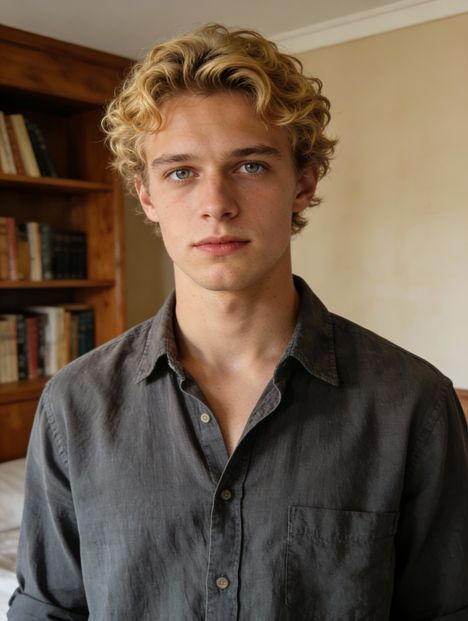
Same orientation as the reference video. Supports up to 30s video generation.
No Watermark
Private
Kling 2.6 Motion Control gratuito en línea
Copia movimiento desde un video de referencia y aplícalo a cualquier personaje para crear videos expresivos y centrados en la expresión con Kling AI.
Por qué todos están hablando de Kling 2.6 Motion Control
Kling 2.6 Motion Control es una función popular de Kling AI, el generador de video con IA creado por KuaiShou, que te permite copiar movimiento y expresión desde un video real y aplicarlo a cualquier imagen de personaje. En lugar de imaginar movimientos a partir de descripciones, Kling sigue la actuación original, por lo que los personajes se mueven de forma natural, reaccionan de manera convincente y mantienen coherencia durante todo el clip. Los creadores usan Kling AI 2.6 Motion Control para animar avatares de IA, construir escenas cinematográficas cortas, remixear movimientos virales y producir contenido atractivo para plataformas como TikTok y X.
Características principales de Kling 2.6 Motion Control
Movimiento sincronizado al 100% con Kling 2.6 Motion Control
Con Kling 2.6 Motion Control, el movimiento del personaje, la expresión facial y el rendimiento general permanecen perfectamente sincronizados en todo el video. En lugar de movimientos desorganizados o inconsistencias, el resultado se siente coherente y deliberado, lo que hace que las escenas sean más creíbles y visualmente estables para narración y contenido creativo.
Reproducción de acciones complejas mediante Kling AI 2.6 Motion Control
Coreografías rápidas, gestos dramáticos, movimientos deportivos y otras acciones exigentes se manejan de forma más confiable con Kling AI 2.6 Motion Control. El movimiento permanece claro y bien organizado incluso en secuencias complejas, razón por la cual muchos creadores lo utilizan para videos de baile, actuaciones cinematográficas y animación expresiva de personajes.
Control preciso de manos y gestos mediante Kling AI Motion Control
Detalles sutiles como señalar, saludar, movimientos suaves del brazo y comportamientos naturales de las manos se conservan con mayor realismo gracias a Kling AI Motion Control. Esto hace una gran diferencia en personajes que hablan, presentadores, tutoriales o escenas donde la creibilidad depende del movimiento fino, no solo del cuerpo completo.
Secuencia de movimiento de 30 segundos en un solo toque con Kling AI Video Generator
El generador de videos Kling AI permite hasta 30 segundos de movimiento continuo en una sola toma, permitiendo que los personajes realicen una escena completa sin necesidad de reiniciar o romper la continuidad. Esta capacidad de 30 segundos es especialmente útil para cortometrajes, secuencias narrativas, videos de actuación y secuencias creativas donde el timing durante toda la duración es clave.
Control de escenas y estilos
Más allá del movimiento en sí, Kling 2.6 Motion Control te permite guiar la atmósfera de la escena, el estilo visual y el entorno mediante indicaciones, sin alterar el rendimiento original. Puedes reutilizar el mismo movimiento en distintos fondos, estados de ánimo o estéticas para explorar múltiples direcciones creativas a partir de una sola actuación.
Comparación de rendimiento de Kling 2.6 Motion Control frente a otros modelos
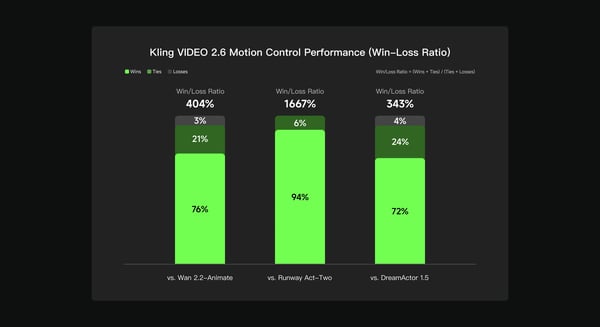
Según una evaluación interna realizada por el equipo de Kling AI, Kling VIDEO 2.6 Motion Control fue comparado con Wan 2.2-Animate, Runway Act-Two y DreamActor 1.5 utilizando pruebas multidimensionales de preferencia humana en calidad de movimiento, consistencia visual y rendimiento general. Los resultados muestran que Kling 2.6 Motion Control obtuvo un mejor rendimiento del 404% frente a Wan 2.2-Animate, del 1667% frente a Runway Act-Two y del 343% frente a DreamActor 1.5, lo que indica una mayor consistencia y generación más confiable de videos controlados por movimiento en distintos escenarios creativos.
Cómo crear videos con Kling 2.6 Motion Control gratuito en Bylo.ai
Sigue estos sencillos pasos para comenzar con nuestra plataforma.
Carga un video de referencia de movimiento
Comienza subiendo un video corto que contenga el movimiento, gesto o actuación que deseas replicar. Kling AI Motion Control utilizará este clip como fuente de movimiento para tu video final.
Añadir una imagen del personaje
Sube una imagen del personaje que deseas animar: una persona, avatar, ilustración o figura estilizada. Kling AI 2.6 Motion Control aplica el movimiento de tu video de referencia directamente a este personaje.
Genera y descarga tu video final
Haz clic en generar, previsualiza el resultado y descarga tu video controlado por movimiento. El generador de videos de Kling AI se encarga automáticamente de la animación, así que puedes enfocarte en ideas creativas en lugar de hacer edición manual.
Lo que la gente está creando con Kling AI 2.6 Motion Control
Personajes IA y avatares animados con Kling AI Motion Control
Creators use Kling AI Motion Control to animate AI characters that speak, react, and express emotion naturally. By transferring motion and facial performance from a reference video, avatars feel more alive and believable, making this use case popular for storytelling, VTuber-style content, and virtual presenters.
Bailes, actuaciones y clips virales con Kling 2.6 Motion Control
With Kling 2.6 Motion Control, creators can remix dance videos, acting performances, and expressive motion into new characters. This workflow is widely used for short-form content on TikTok, Reels, and X, where motion accuracy and expressive timing make videos stand out.
Cortos y narraciones con Kling AI Video Generator
The Kling AI video generator enables filmmakers and storytellers to prototype scenes quickly by applying performance from one video onto different characters and visual styles. This allows creators to explore ideas, test concepts, and build narrative clips without complex animation tools.
Videos educativos y de presentación con Kling AI
Many users rely on Kling AI to create engaging explainer videos, tutorials, and presentation-style content. By animating characters with clear gestures and natural delivery, educational videos become easier to follow and more visually engaging.
Consejos para obtener mejores resultados con Kling AI Motion Control
Sigue estos consejos útiles para maximizar tu experiencia en nuestra plataforma.
Usa referencias de movimiento claras para Kling 2.6 Motion Control
Elige videos de referencia donde el sujeto esté bien visible y el movimiento sea continuo. Imágenes limpias con un enfoque estable ayudan a Kling 2.6 Motion Control a seguir la actuación con mayor precisión y generar una animación más fluida.
Mantén el cuerpo y los brazos claramente visibles con Kling AI Motion Control
Para obtener mejores resultados, asegúrate de que el cuerpo completo, los brazos y las manos estén claramente visibles en el video de referencia y no estén bloqueados por objetos ni recortados. Kling AI Motion Control funciona mejor cuando puede seguir con precisión la postura y el movimiento de los miembros a lo largo de la escena.
Alinea el enmarcado del personaje con Kling AI Motion Control
Mantén la imagen de tu personaje alineada con el enmarcado de referencia (por ejemplo, imagen de cuerpo completo con movimiento de cuerpo completo, media imagen con movimiento de media imagen). Esto ayuda a Kling AI Motion Control a mantener proporciones más naturales y movimientos consistentes.
Refina el estilo y la escena con Kling AI Video Generator
Una vez que el movimiento se vea bien, experimenta con prompts para explorar fondos, estados de ánimo y estilos visuales diferentes. Kling AI Video Generator te permite reutilizar el mismo movimiento mientras pruebas múltiples direcciones creativas.
¿Buscas una forma distinta para crear videos con IA?
Kling Motion Control está diseñado para movimientos precisos de cámara y escenas centradas en el movimiento. Si tu objetivo va más allá del control de movimiento y entra en la creación de videos narrativos completos, Kling 3.0 es otra opción que puedes explorar. Como modelo de video AI autónomo, Kling 3.0 se enfoca en la generación cinematográfica multi-toma, audio nativo, personajes consistentes y duración de video más larga, lo que lo hace ideal para narración, escenas de diálogo y videos completamente generados por IA.