
Select the model you want to generate your video with.
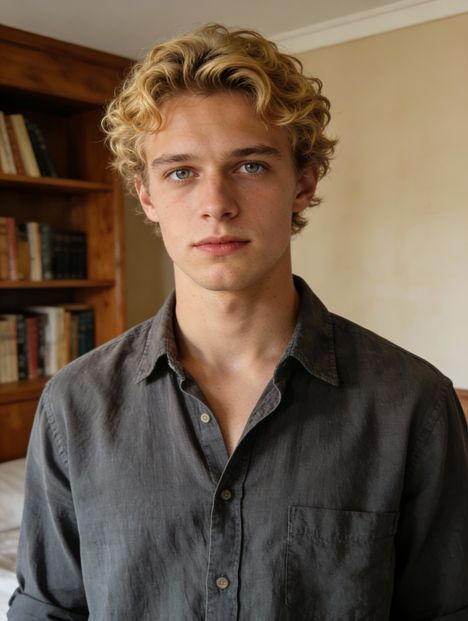
Same orientation as the reference video. Supports up to 30s video generation.
No Watermark
Private
Kostenloser Kling 2.6 Motion Control online
Kopieren Sie Bewegungen aus einem Referenzvideo und wenden Sie diese auf beliebige Charaktere an, um ausdrucksstarke, performancedeckende Videos mit Kling AI zu erstellen.
Warum alle über Kling 2.6 Motion Control sprechen
Kling 2.6 Motion Control ist eine beliebte Funktion von Kling AI, dem KI-Video-Generator von KuaiShou. Sie ermöglicht es Ihnen, Bewegungen und Ausdruck aus einem echten Video zu kopieren und auf beliebige Charakterbilder anzuwenden. Im Gegensatz zu Prompt-basierten Bewegungsgenerierung folgt Kling der ursprünglichen Performance – die Charaktere bewegen sich natürlich, reagieren überzeugend und sind konsistent über den gesamten Clip hinweg. Künstler nutzen Kling AI 2.6 Motion Control, um KI-Avatare zu animieren, kurze künstlerische Szenen zu erstellen, virale Bewegungen zu remixen und ansprechendes Content für Plattformen wie TikTok und X zu produzieren.
Wichtige Funktionen von Kling 2.6 Motion Control
Perfekt synchronisierte Bewegung mit Kling 2.6 Motion Control
Mit Kling 2.6 Motion Control bleiben Körpersprache, Mimik und Gesamtleistung des Charakters über die gesamte Dauer des Videos konsistent und synchron. Es entstehen keine ungleichmäßigen Bewegungen oder inkonsistente Darstellungen – das Ergebnis wirkt gezielt, kohärent und visuell stabil, was für Geschichten und kreative Inhalte von Vorteil ist.
Komplexe Bewegungen mit Kling AI 2.6 Motion Control
Tanz, Dramatik, Sportbewegungen und andere anspruchsvolle Aktionen werden mit Kling AI 2.6 Motion Control präziser und zuverlässiger umgesetzt. Selbst bei komplexen Sequenzen bleibt die Bewegung strukturiert und lesbar – ein Grund, warum viele Kreative es für Tanzvideos, künstlerische Darbietungen und expressive Charakteranimationen nutzen.
Präzise Hand- und Gestensteuerung durch Kling AI Motion Control
Kleine Details wie Zeigegesten, Schwingbewegungen, subtile Armbewegungen und natürliche Handaktionen werden mit Kling AI Motion Control überzeugender realisiert. Das macht einen deutlichen Unterschied bei Sprechern, Präsentatoren, Tutorials und Szenen, in denen Glaubwürdigkeit durch feine Bewegung statt großer Körperbewegungen entsteht.
30 Sekunden lange Bewegung mit dem Kling AI Video Generator
Der Kling AI-Videogenerator unterstützt bis zu 30 Sekunden kontinuierliche Einzelaufnahme-Bewegung, sodass Charaktere ganze Szenen durchführen können, ohne häufige Zurücksetzungen oder Unterbrechungen der Kontinuität. Diese 30-Sekunden-Funktion macht ihn besonders geeignet für Kurzfilme, Erzählclips, Performance-Videos und kreative Sequenzen, bei denen die Timing-Kontrolle über die gesamte Dauer entscheidend ist.
Szene- und Stilgestaltung mit Kling 2.6 Motion Control
Neben der Bewegungssteuerung erlaubt Kling 2.6 Motion Control auch die Steuerung der Szeneatmosphäre, des visuellen Stils und der Umgebung über Prompts – ohne die ursprüngliche Performance zu beeinträchtigen. Sie können dieselbe Bewegung in verschiedenen Hintergründen, Stimmungen oder ästhetischen Ansätzen wiederverwenden, um verschiedene kreative Richtungen aus einer einzigen Performance zu erkunden.
Leistungsvergleich von Kling 2.6 Motion Control gegenüber anderen Modellen
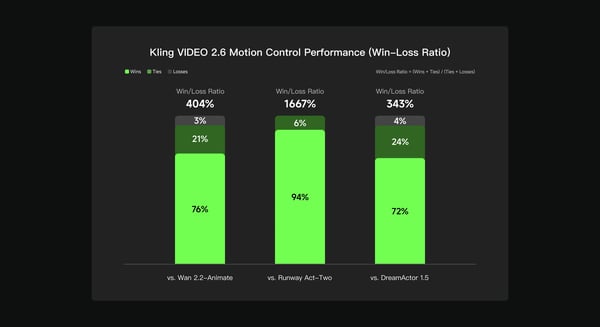
Basierend auf einer internen Bewertung des Kling AI-Teams wurde Kling VIDEO 2.6 Motion Control mit Wan 2.2-Animate, Runway Act-Two und DreamActor 1.5 anhand multidimensionaler menschlicher Präferenztests in Bezug auf Bewegungsqualität, visuelle Konsistenz und Gesamtleistung verglichen. Die Ergebnisse zeigen, dass Kling 2.6 Motion Control ein Gewinnverhältnis von 404% gegenüber Wan 2.2-Animate, 1667% gegenüber Runway Act-Two und 343% gegenüber DreamActor 1.5 erreichte – ein Hinweis auf eine stärkere Konsistenz und zuverlässigere Bewegungssteuerung in verschiedenen kreativen Szenarien.
So erstellen Sie kostenlose Videos mit Kling 2.6 Motion Control auf Bylo.ai
So beginnen Sie einfach mit unserer Plattform.
Referenzvideo für Bewegung hochladen
Laden Sie zunächst ein kurzes Video hoch, das die Bewegung, Geste oder Performance enthält, die Sie abbilden möchten. Kling AI Motion Control verwendet diesen Clip als Bewegungsquelle für Ihr Endvideo.
Fügen Sie ein Charakterbild hinzu
Laden Sie ein Bild des zu animierenden Charakters hoch – es kann sich um eine Person, einen Avatar, eine Illustration oder eine stilisierte Figur handeln. Kling AI 2.6 Motion Control wendet die Bewegung Ihres Referenzvideos direkt auf diesen Charakter an.
Generieren und Herunterladen Ihres Videos
Klicken Sie auf „Generieren“, sehen Sie sich das Ergebnis an und laden Sie Ihr bewegungssteuertes Video herunter. Der Kling AI-Videogenerator übernimmt die Animation automatisch, sodass Sie sich auf kreative Ideen statt auf manuelles Bearbeiten konzentrieren können.
Was Benutzer mit Kling AI 2.6 Motion Control erstellen
KI-Charaktere und animierte Avatare mit Kling AI Motion Control
Creators use Kling AI Motion Control to animate AI characters that speak, react, and express emotion naturally. By transferring motion and facial performance from a reference video, avatars feel more alive and believable, making this use case popular for storytelling, VTuber-style content, and virtual presenters.
Tanz, Performance und beliebte Clips mit Kling 2.6 Motion Control
With Kling 2.6 Motion Control, creators can remix dance videos, acting performances, and expressive motion into new characters. This workflow is widely used for short-form content on TikTok, Reels, and X, where motion accuracy and expressive timing make videos stand out.
Kurzfilme und Geschichten mit Kling AI Video Generator
The Kling AI video generator enables filmmakers and storytellers to prototype scenes quickly by applying performance from one video onto different characters and visual styles. This allows creators to explore ideas, test concepts, and build narrative clips without complex animation tools.
Lehr- und Präsentationsvideos mit Kling AI
Many users rely on Kling AI to create engaging explainer videos, tutorials, and presentation-style content. By animating characters with clear gestures and natural delivery, educational videos become easier to follow and more visually engaging.
Tipps zur Verbesserung der Ergebnisse mit Kling AI Motion Control
Folgen Sie diesen hilfreichen Tipps, um das Beste aus unserer Plattform herauszuholen.
Nutzen Sie klare Bewegungsbeispiele für Kling 2.6 Motion Control
Wählen Sie Referenzvideos, bei denen das Objekt klar sichtbar ist und die Bewegung kontinuierlich abläuft. Sauber gefilterte, stabil aufgenommene Aufnahmen helfen Kling 2.6 Motion Control, die Performance präzise zu verfolgen und glattere Animationen zu erzeugen.
Halten Sie Körper und Gliedmaßen gut sichtbar mit Kling AI Motion Control
Für optimale Ergebnisse stellen Sie sicher, dass im Referenzvideo der gesamte Körper, die Arme und die Hände klar sichtbar sind und nicht durch Objekte verdeckt oder abgeschnitten wurden. Kling AI Motion Control funktioniert besser, wenn es eine klare Verfolgung der Körperhaltung und Gliedmaßenbewegung über die gesamte Szene ermöglichen kann.
Charakter-Framing anpassen mit Kling AI Motion Control
Achten Sie darauf, dass Ihr Charakter-Framing mit dem Referenz-Framing übereinstimmt (z. B. Vollkörperbild mit Vollkörperbewegung, Halbkörper mit Halbkörperbewegung). Das hilft Kling AI Motion Control dabei, natürliche Proportionen und konsistente Bewegungen zu erhalten.
Stil und Szene anpassen mit dem Kling AI Video Generator
Sobald die Bewegung gut aussieht, können Sie mit Prompting verschiedene Hintergründe, Stimmungen und visuelle Stile ausprobieren. Der Kling AI Video Generator erlaubt es Ihnen, dieselbe Bewegung zu nutzen, um verschiedene kreative Richtungen zu testen.
Suchen Sie nach einem anderen Ansatz für KI-Video-Generierung?
Kling Motion Control ist für präzise Kamerabewegungen und bewegungsfokussierte Szenen konzipiert. Wenn Ihr Ziel darüber hinausgeht, Bewegungen zu steuern und vollständige Erzählvideo-Generierung zu erreichen, bietet Kling 3.0 eine weitere Option. Als eigenständiges KI-Video-Modell konzentriert sich Kling 3.0 auf kinoähnliche Multi-Shot-Generierung, native Audio-Unterstützung, konsistente Charaktere und längere Videodauer – perfekt für Erzählung, Dialogszenen und vollständig KI-generierte Videos.